Set up your coding agents once.

tackroom keeps skills, MCP servers, hooks and roles in one ~/.agents repo and syncs them into each agent's native config.

brew install yourconscience/tap/tackroom
tackroom setup

Works with the agents you already run

  • Claude Codeskills, roles, MCP, hooks
  • Codexskills, roles, MCP, hooks
  • Factory Droidskills, roles, MCP, hooks
  • Qwen Codeskills, roles, MCP, hooks
  • OpenCodeskills, roles, MCP
  • Piskills, roles, MCP
  • OMPskills, roles, MCP
  • Hermesskills, MCP, hooks
  • Ampskills, MCP
  • Cursorskills, roles, MCP, hooks
  • GitHub Copilot CLIskills, roles, MCP, hooks
  • Grok Buildskills, roles, MCP, hooks
  • OpenClawskills, MCP
  • DeepSeek Harnessskills, MCP

Why “tackroom”

In a stable, the tack room is where the riding gear lives. Every horse has its own peg, with a saddle and bridle fitted to that horse and a plate with its name.

tackroom is that room for your coding agents. Skills, MCP servers, hooks and roles live in one place, ~/.agents, and every agent gets its gear fitted to its own config format.

Install

Homebrew, npm or npx. One Go binary for macOS or Linux.

install
$ brew install yourconscience/tap/tackroom
# or: npm i -g tackroom
$ tackroom
tackroom - manage shared skills, MCP, and canonical config

Commands:
  setup    Set up this machine and sync configured harnesses
  status   Show harness, external lock, and memsearch state
  sync     Regenerate committed artifacts and reconcile harnesses
  doctor   Check pins, dependencies, and local health
  config   Validate or print the canonical YAML
  view     Author the canonical YAML in a loopback web UI (browser)

Set up

Finds your agents, shows what they already have, and imports it after you review each item.

setup
$ tackroom setup --dry-run
needs review:
  mcp     context7  [claude]
  skill   pr-review  [claude]
identical everywhere (would be shared automatically):
  skill   release-notes  [claude codex]

$ tackroom setup --yes --memory off
config root: ~/.agents

imported 3 item(s) without prompting (--yes)

claude: config already set
codex: config already set
hermes: config patched (added ~/.agents/skills)
omp: config already set
pi: config already set
qwen-code: config patched (added ~/.agents/skills)
...first sync follows

Sync

Writes skills, roles, MCP servers and hooks into every agent. Run it again any time; it only changes what drifted.

sync
$ tackroom sync
$ tackroom status
claude   ✓ synced
  managed     4 skills · 6 agents · 1 mcp · 1 hooks
codex   ✓ synced
  managed     4 skills · 6 agents · 1 mcp · 1 hooks
hermes   ✓ synced
  managed     4 skills
omp   ✓ synced
  managed     4 skills · 6 agents
pi   ✓ synced
  managed     4 skills · 6 agents · 1 mcp
qwen-code   ✓ synced
  managed     4 skills · 6 agents

Everything is synced.

Check

Validates every skill, confirms lock pins and scans third-party skills before they reach an agent.

doctor
$ tackroom doctor
  skill frontmatter .............. pass (4 skills valid)
  skill spec ..................... pass (4 skills conform to agentskills.io spec)
  agent roles .................... pass (6 roles valid)
  package age .................... pass (1 references at least 3 days old)
  external skill lock ............ pass (1 sources pinned and in sync)
  external skill audit ........... pass (1 skills scanned, no risky patterns)
  native hooks ................... pass (2 registrations, 2 managed, 0 unmanaged)
...
14 passed, 3 warning, 0 failed

Rather click than edit YAML?

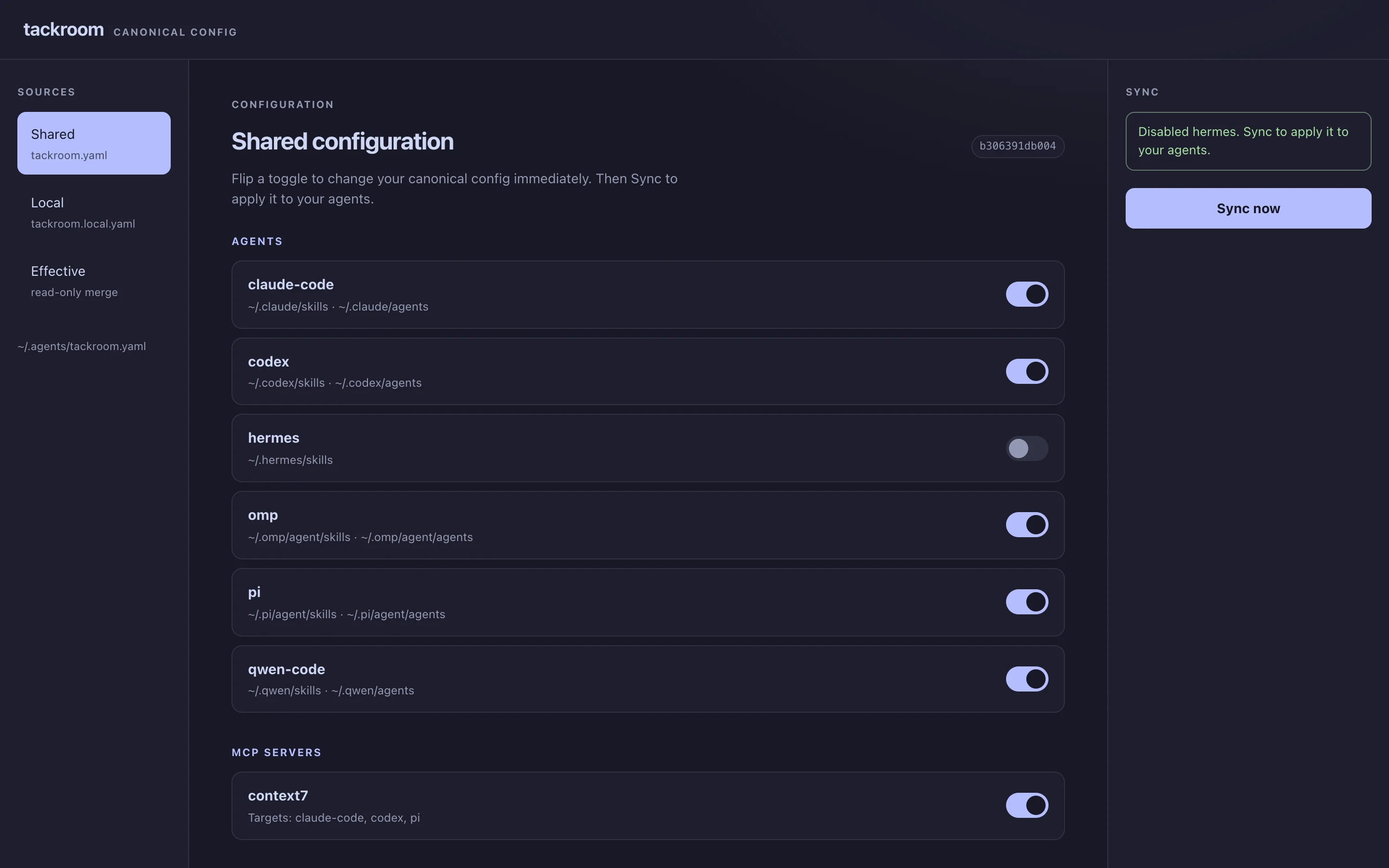
tackroom view opens a local dashboard over the same config: what every agent has on disk, which agents get each MCP server and hook, and what tackroom leaves alone. Change it, review the plan, then sync. It listens on 127.0.0.1 behind a session token.

tackroom view in a browser: agents claude-code, codex, hermes, omp, pi and qwen-code with toggles, Hermes switched off, a context7 MCP server, and a Sync now button
The demo config from above, right after switching Hermes off. The toggle edits tackroom.yaml; the next sync skips Hermes.

One entry in ~/.agents, each agent's own format.

The MCP server and hook from the demo, as written into each agent's files. Pick an agent.

~/.agents/tackroom.yamlyou edit this
mcp_servers:
  - name: context7
    enabled: true
    command: npx
    args:
      - -y
      - '@upstash/context7-mcp'
    agents:
      - claude
      - codex
      - pi
hooks:
  - name: notify-on-stop
    enabled: true
    event: Stop
    command: ~/.agents/hooks/notify.sh
    timeout: 10
    agents:
      - claude
      - codex
~/.claude.jsonMCP
"mcpServers": {
  "context7": {
    "type": "stdio",
    "command": "npx",
    "args": [
      "-y",
      "@upstash/context7-mcp"
    ]
  }
}
~/.claude/settings.jsonhook
"hooks": {
  "Stop": [
    {
      "hooks": [
        {
          "command": "~/.agents/hooks/notify.sh",
          "timeout": 10,
          "type": "command"
        }
      ]
    }
  ]
}
~/.claude/skills, root doc
skills/grilling -> ~/.agents/skills/grilling
skills/tackroom -> ~/.agents/skills/tackroom
CLAUDE.md       -> ~/.agents/AGENTS.md

What each agent gets

AgentSkillsRolesMCP serversHooksPlugins

synced tackroom writes itsettings tackroom points the agent at ~/.agents/skillsnative the agent reads ~/.agents/skills on its ownplanned on the roadmap

Made to live next to the config you already have

Third-party skills get checked first

A skill from someone else's repo is prompt code. tackroom doctor scans it for risky patterns and checks it against the agentskills.io spec. It also flags npm and PyPI packages your config pulls in if they are less than three days old.

$ tackroom doctor
  package age .............. pass (1 references at least 3 days old)
  external skills .......... pass (1 sources valid)
  external skill lock ...... pass (1 sources pinned and in sync)
  external skill audit ..... pass (1 skills scanned, no risky patterns)

Pinned to a commit

tackroom.lock records the exact commit. Nothing moves until you run tackroom skill update.

Your entries stay yours

tackroom marks what it manages. Everything else in .claude.json or config.toml stays as you wrote it.

Same setup on every machine

~/.agents is a git repo. Push it to a private remote, then pull on the next machine.

$ git clone git@github.com:you/agents.git ~/.agents
$ tackroom sync --pull

Machine-only settings

tackroom.local.yaml overlays the shared config and stays out of git, for a work laptop or a GPU box.

# ~/.agents/tackroom.local.yaml
agents:
  - name: hermes
    enabled: false

Next to similar tools

rulesync and ruler generate per-project config for many tools. tackroom carries one personal setup into the agents you use every day.

tackroomrulesyncruleropenskills
Scopeone user, every projectper projectper projectuser and project
Skillsyesyesexperimentalyes
MCP serversyesyesyesno
Hooksyesyesnono
Agent rolesnative per agentyesexperimentalno
External skillspinned and auditednot pinnednot pinnedtracks source

Before you install

Will it overwrite what my agents already have?
No. setup copies existing skills, MCP servers and roles into ~/.agents after you review each one, and sync only touches entries tackroom manages.
Which systems does it run on?
macOS and Linux, on Apple silicon, ARM and x86. Homebrew and npm install the same checksum-verified binary from GitHub Releases.
Do I have to use every surface?
No. Start with skills. MCP servers, hooks, roles and memory are separate sections of tackroom.yaml, and an agent you switch off is left alone.
What about Cursor?
Cursor reads ~/.agents/skills on its own, so tackroom does not copy skills there. Sync writes its roles, MCP servers and hooks under ~/.cursor.
Can someone use one of my skills without tackroom?
Yes. Any skill in your repo installs with npx skills add you/agents -s name --copy.
What pairs well with it?
HarnessKit to look at what each agent loaded, and AgentsView to search past sessions. Let tackroom do the writing.